

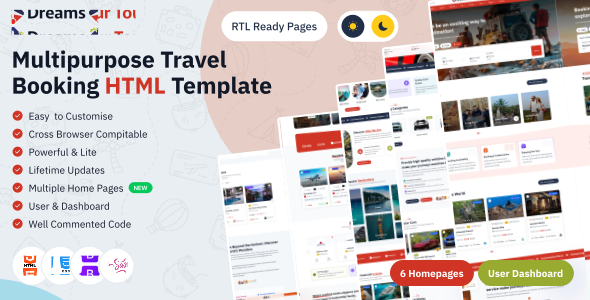
DreamsTour is a travel and tour booking template built with Next.js and React 19. It covers the complete booking journey - flights, hotels, tours, cruises, car and bus rentals, activities and visa services - along with agent and user dashboards. DreamsTour is a well-designed, fully responsive template with multiple home page variants, dark mode and RTL support, making it easy to launch a travel or tour agency website.
- Images in the preview are for visual representation only and are not included in the final purchase.
- This is not a functional product, It is a HTML5 template
DreamsTour offers powerful admin template and modern interface.
- Build with React 19
- A file-system based router built
- Client-side and Server-side Rendering with Client and Server Components.
- Pure Components Based Nextjs
- Improved support for TypeScript
- Fully Responsive Design
- Multiple Layouts
- Fully Responsive Layout
- User friendly design
- Cross Browser Compatible
- Easy to Customize
- Clean & Well Commented Codes
- Compatible to all Mobile Devices
- Detailed Documentation
- Developer Friendly
- And Many More...
Project Overview
The Next.js project uses the App Router and follows the Dreams ERP folder structure: each route folder in app/ has a page.tsx (metadata) and a client file that loads the page from views/; shared UI lives in components/ and all styles in style/ with app/globals.scss as the central custom stylesheet.
nextjs/ │ ├── public/ │ └── assets/img/ # Template images │ ├── src/ │ │ │ ├── app/ # App Router (URLs come from the folders) │ │ ├── (public-pages)/ # Pages with header and footer │ │ │ ├── layout.tsx # Uses layout/publicLayout.tsx │ │ │ ├── index-1/ ... index-12/ │ │ │ ├── flight/ hotel/ car/ cruise/ tour/ bus/ │ │ │ ├── activity/ guide/ visa/ blog/ pages/ │ │ │ ├── agent/ user/ │ │ │ └──/ │ │ │ ├── page.tsx # Server component: page metadata │ │ │ └── Client.tsx # Client component: loads the view │ │ ├── (auth-pages)/ # Login, register, error and maintenance pages │ │ │ └── layout.tsx # Uses layout/authLayout.tsx │ │ ├── layout.tsx # Root layout: providers + global stylesheets │ │ └── globals.scss # Central custom stylesheet │ │ │ ├── components/ # Reusable UI shared by every page │ │ ├── app-swiper/ # Swiper slider + presets matching the HTML carousels │ │ ├── common-select/ # Select (PrimeReact Dropdown) │ │ ├── common-date-picker/ # Date / time pickers (PrimeReact Calendar) │ │ ├── data-table/ # Data table (PrimeReact DataTable) │ │ ├── common-header/ common-footer/ breadcrumb/ │ │ ├── loader/ cursor/ video-modal/ modals/ │ │ └── ... │ │ │ ├── views/ # Page content, one folder per module │ │ ├── home-one/ ... home-twelve/ │ │ ├── flight/ hotel/ car/ cruise/ tour/ bus/ │ │ ├── activity/ guide/ visa/ blog/ pages/ auth/ │ │ ├── agent-dashboard/ │ │ └── user-dashboard/ │ │ │ ├── config/ │ │ └── metadata.ts # Page titles / SEO metadata │ ├── core/data/ # Types and static demo data │ ├── hooks/ │ ├── layout/ │ │ ├── publicLayout.tsx │ │ └── authLayout.tsx │ ├── providers/ │ │ ├── StoreProvider.tsx # Redux store │ │ ├── ThemeSync.tsx # Restores / applies theme, loader and RTL settings │ │ └── BootstrapJs.tsx # Loads Bootstrap JS in the browser │ ├── redux/ │ │ ├── store.ts │ │ ├── hooks.ts │ │ └── slices/ │ ├── routes/ │ │ └── all_routes.tsx # Every route path in one place │ ├── utils/ │ ├── types/ │ ├── style/ │ │ ├── css/ │ │ ├── fonts/ │ │ └── scss/ # Same partials as the HTML template │ │ ├── base/ components/ layout/ pages/ utils/ vendors/ │ │ └── main.scss │ └── environment.tsx │ ├── next.config.ts ├── eslint.config.mjs ├── tsconfig.json ├── package.json └── package-lock.json
After unzipping Template Files, you will find our product DreamsTour ->Nextjs(Source code)Mandatory are npm and node are needed to run the nextjs projectOnce unzipped the files,run the command:
npm install (or) npm iFor running a project , run the command:
npm run devIf you want to run the project and make the build in the production mode then run the following command in the root directory, otherwise the project will continue to run in the development mode.
npm run buildTo install any plugins in your application, you have to run the following command
npm install plugin_name --saveYou can change the font you can edit it from Scss file.
Path:src/style/scss/utils/_variables.scss
@import url('https://fonts.googleapis.com/css2?family=IBM+Plex+Sans:wght@100;400;500;600;700&display=swap');You can choose a font style from Google Fonts, and replace the existing link in your project with the one corresponding to your selected font.
To apply the new font, update the $font-family-primary variable (used by the body selector in src/style/scss/base/_base.scss) in the following SCSS file:
Path: src/style/scss/utils/_variables.scss
$font-family-primary: "IBM Plex Sans", sans-serif;
You will see a Light mode and Dark mode button in the header. Choose any one of the option to change website theme.

The theme is stored in Redux and applied to the <html> tag by
src/providers/ThemeSync.tsx. To make Dark mode the default, change the
initial dataTheme from "light" to
"dark-mode" in src/redux/slices/themeSettingSlice.ts.
To enable Right-to-Left (RTL) layout in a Bootstrap-powered page, you need to follow these steps to ensure proper support and display for RTL languages like Arabic, Hebrew, etc. Here’s a guide with clear steps and explanations.
Step 1: Applying RTL Direction via CSS
[dir="rtl"] {
	direction: rtl;
	background: #fff;
	left: 0;
	position: fixed;
	right: 0;
	top: 0;
	height: 66px;
		}
Explanation: The direction: rtl; property is applied to the "html" element via the CSS style block.This ensures that the entire content of the page flows from right to left.
DreamsTour is developed by Dreams Technologies and is available under both Envato Extended & Regular License options.
Regular License
Usage by either yourself or a single client is permitted for a single end product, provided that end users are not subject to any charges.
Extended License
For use by you or one client in a single end product for which end users may be charged.
What are the main differences between the Regular License and the Extended License?
If you operate as a freelancer or agency, you have the option to acquire the Extended License, which permits you to utilize the item across multiple projects on behalf of your clients.
| NAME | URL |
|---|---|
| Next.js | https://nextjs.org/ |
| Bootstrap | https://getbootstrap.com/ |
| React | https://react.dev/ |
| Redux Toolkit | https://redux-toolkit.js.org/ |
| PrimeReact | https://primereact.org/ |
| React Bootstrap | https://react-bootstrap.netlify.app/ |
| Swiper | https://swiperjs.com/ |
| ApexCharts | https://apexcharts.com/ |
| React CountUp | https://www.npmjs.com/package/react-countup |
| GSAP | https://gsap.com/ |
| Yet Another React Lightbox | https://yet-another-react-lightbox.com/ |
| Quill | https://quilljs.com/ |
| React Simple WYSIWYG | https://www.npmjs.com/package/react-simple-wysiwyg |
| React Phone Number Input | https://www.npmjs.com/package/react-phone-number-input |
| React Google Maps API | https://www.npmjs.com/package/@react-google-maps/api |
| date-fns | https://date-fns.org/ |
| Fontawesome | https://fontawesome.com/ |
| Tabler Icons | https://tabler.io/icons |
| Iconsax | https://iconsax.io/ |
| Google Fonts | https://fonts.google.com/ |
Need Support?
If this documentation does not address your questions, please feel free to contact us via email at support@dreamstechnologies.com
Reach the team at GMT+5:30. Typical reply within 12–24 hours on weekdays — rarely up to 48 hrs during holidays. Support is available to verified buyers for template-related issues.
Contact SupportImportant Note : We strive to offer top-notch support, but it's only available to verified buyers and for template-related issues such as bugs and errors. Custom changes and third-party module setups are not covered.
Do you need a customized application for your business?
If you need a customized application for your business depends on your specific requirements and goals, Please contact us. Customization can be the key to success, ensuring your project perfectly aligns with your unique goals and requirements.
Don't Miss Out on the Benefits of Customization!
Unlock the potential of your project. It's time to ensure your project isn't another cookie-cutter solution but truly unique and effective one.
Discover how customization can make a difference in your project's success. Let's create a solution that's as unique as your vision!
We'll tailor the application to meet your specific needs and preferences.
We will upload your website to the server and ensure it is live.

Thank You
Thank you once again for downloading DreamsTour.
We hope you're enjoying your experience, and we kindly request that you take a
moment to share your valuable review and rating with us.